
Below a guide to leave whatsapp Beta version.
SOLUTION #1
Android
Open WhatsApp > tap More options.
Tap Linked Devices.
Tap Multi-device beta.
Tap LEAVE BETA
If you don’t see the “Leave Beta” button, go to solution #2 or solution #3
iPhone
Go to WhatsApp Settings.
Tap Linked Devices.
Tap Multi-Device Beta.
Tap Leave the beta.
If you don’t see the “Leave Beta” button, go to solution #2 or solution #3
SOLUTION #2
- Go to this page https://play.google.com/apps/testing/com.whatsapp (access with your device google account)
- Leave the Beta tester program
- Uninstall and reinstall Whatsapp in your device
SOLUTION #3
ANDROID:
- Open Play Store app and click on the profile picture on the Home page

2. Click Settings > General > Account and Device Preferences
3. Scroll down to the History section and you will see the option Leave Beta programs
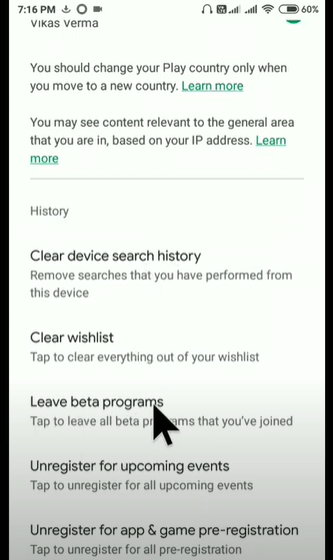
4. Click on Leave beta programs and confirm by clicking Leave.
IOS:
- Go to App Market and install TestFlight app (the app for Beta testing)
- Remove Whatsapp from there
- Install a regular version of Whatsapp from AppStore
SOLUTION #4
If solution #2/3 is not working, try this:
- Uninstall Whatapp from your device
- Go to google play and re-install it